Working offline: project status available online and downloaded
In brief: BauMaster works with and without an internet connection. Data is stored locally and synchronised as soon as a connection exists again. Via the “downloaded” status you define per device which projects including photos and drawings are available offline.
Working offline
Storing data locally in case there is no internet is a basic setting. BauMaster stores all information on your device. As soon as there is internet access again, BauMaster synchronises all data to the cloud — you and your colleagues are on the same page again.
Project status “downloaded”
Open a project: there you find the label “download” with a small download symbol. It defines whether a project should be “downloaded”. Any user can do that, admin or not — provided they are in the project’s project team. Once a project is downloaded you can also access all drawings and photos offline — that requires a corresponding amount of device storage.
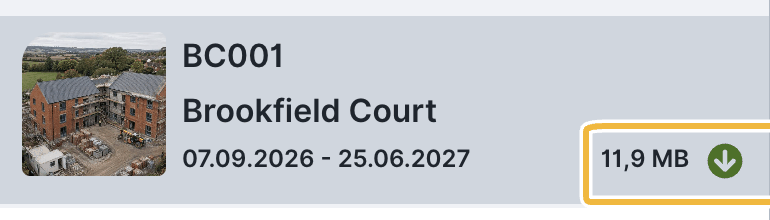
Visible offline are downloaded projects as well as projects you have used in the last 10 days (see “automatic management”). If a project is not downloaded, you access existing photos and drawings only with an internet connection.
The “downloaded” status is recorded per device and not controlled by the admin. Every user decides for each of their devices which projects are available offline. If a user signs in on another device, a different setting may apply there.
Automatic management
To keep BauMaster fast and the sync data volume small, the offline status is partly managed automatically:
- Automatic deactivation: if a downloaded project is not edited for more than 60 days, BauMaster deactivates “downloaded” automatically. That saves storage and speeds up synchronisation.
- Recently used: projects used within the last 10 days can also be edited offline without “downloaded” — however only text data is available then. Image data is loaded on demand (internet connection needed), otherwise a placeholder appears.
Tip: deactivate “downloaded” for projects you are not currently using. Especially with large projects that saves a lot of device storage, which speeds BauMaster up noticeably.
FAQ
Can I work without an internet connection?
Yes. BauMaster stores data locally and synchronises it automatically as soon as a connection exists again.
When does BauMaster synchronise my data?
Automatically as soon as the device is online again. If problems occur, the article on synchronisation helps.
Why is "downloaded" suddenly deactivated for a project?
After 60 days without editing BauMaster deactivates the status automatically to save storage and speed up synchronisation.
Keywords: work offline