Manage documents and view PDF records and reports
In brief: all sent or closed PDF records, site diaries and reports are available as PDF files under drawings & documents (project room) in the burger menu. There you also see the recipient list and who has seen a record (seen status).
View PDF records
Under PDF records you find a list of all record styles that are active in the selected project — or that are now inactive but already have closed or sent PDF records (handover record, file note, work preparation, for example).
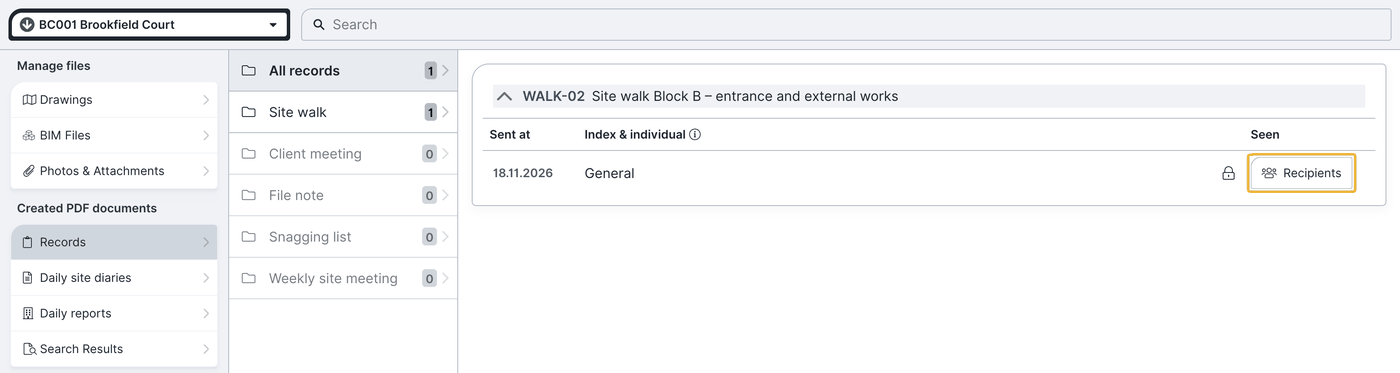
Clicking a record style shows all its PDF records. In the list you see per record:
- via the padlock symbol whether the record is closed or open,
- in the columns sent, index and individual when and how it was sent. An individually sent record is marked: “{index} complete” stands for the complete record, “{index} {company name}” for the individual record to the recipients of that company.
Who a document went to and who has seen it is shown by the recipient list (see below).
View PDF reports
The area created PDF documents (under drawings & documents) also holds the PDF records; in addition you see there all closed and sent site diaries with their respective site diary sheets as well as daily reports; the daywork sheets sit below the daily reports. One click on the respective report downloads the PDF document and displays it.
View the recipient list
Click the “recipient list” button on the right — the list opens showing who a document was sent to. There you see:
- who received the PDF document (recipients from the distribution list),
- who was present,
- and who opened (saw) the link to the record.
An eye symbol that is not struck through shows that the person opened the record (seen status). This information exists only in the recipient list on the record — the “sent emails” overview shows only the download status.
Display and download a PDF document
Click the row of the document in the list (columns sent, index or individual); after a short loading time a preview of the PDF document opens as a pop-up. In that window you can switch between pages, zoom in or out and download the PDF document.
FAQ
Where do I find sent or closed records and reports?
Under “drawings & documents” in the burger menu — records in the “created PDF documents” area (also under “PDF records”), site diaries and daily reports in the “created PDF documents” area (the daywork sheets sit below the daily reports).
How do I recognise who opened a record?
By the recipient list on the record: an eye symbol that is not struck through shows that the person opened the record link.
Can I view and download a PDF record directly?
Yes. Clicking the record’s row opens a PDF preview from which you can download the document.
Where do I see all emails sent from BauMaster?
In the “sent emails” overview — see Overview of sent emails.
Keywords: manage documents